Monday, September 18, 2006

Google your computer

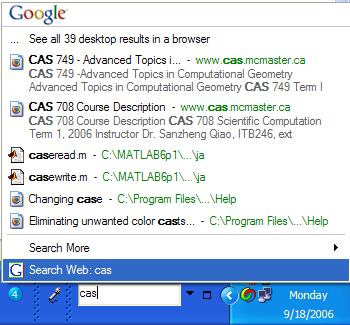
Since I formatted my computer last week I had to reinstall a lot of the software I initially had. I was downloading Google Earth since I like just playing around with it once in a while, and I came across Google Desktop. It brings Google search to your desktop and allows you to search for files on your machine very quickly and efficiently. It has several nice features since you can add several gadgets suchs as weather, news, etc. I took them all off since itll probably just slow down my computer, plus I dont need all these things all the time.
By default the Google Desktops bar will appear on the right of the screen, but it took too much space so I just moved it down to the bottom in the taskbar and then made it more compact by removing all the other unecessary features like the weather.



I also installed a neat virtual desktop called MSVDM and thats what you see in that image next to Google Desktop. This gives you 4 virtual desktops to organize your work on. I am a fan of multiple desktops and alway use it on my Apple laptop and it just makes working on several things less chaotic. For example on one desktop you can have your favorite email program open, and on the next desktop your assignment work, while on the third you have some reference website for your assignment. Switch between desktops by clicking on the desktop number and everything assigned to that desktop will appear while the rest is minimized. That is why it is called virtual, as its really not 4 desktops, but it just behaves as if there were 4.



Friday, September 08, 2006

Where did my summer go?

So summer is officially over now, and its back to school for thousands of students including one new grad student by the name of Nael..yup thats me, I started my studies yesterday, but I had no classes yet. Neither did I have classes today, but everything should kick into 4th gear next week.

I managed to get myself my old undergrad job at UTS again, so Im an SSC again for the 3rd year in a row. Lots of things changed in the labs, mainly BSB and Mills this year. The new labs use ID cards to open after hours, and the best part these new labs open on their own in the morning and close alone at night. Apparently all the labs will be fitted for this which is great! Even better, instructor's id cards can be programmed to open the labs as well, so if an instructor needs the lab open early, they can go ahead and do it themselves!

I met with my supervisor, Dr. Christopher Anand two days ago and talked about my project somewhere. Although I spoke with one of the other grad students, he gave me a better picture of what I am required to do for this project. They are having some visual problems with the software, and the way somethings are drawn and thats where I am to start the project and get familiar with the code base.


Thursday, August 31, 2006

M. Eng in 7 days

My final week of my summer is about to start. Next week this time I would have finnished my first day of classes in the Masters of Computational Engineering program - if I have any classess that day. I have to take 7 courses during the program to graduate with this degree and I should be all done by Dec 2007. The plan is to take 3 courses now, another three next term and one more course in my final term. Ill be working on my project during this time as well.

I already talked to my professor and Ill be working on a way to optimize MRI magnetic coils and their placement around an object. I should be visiting St. Jose Hospital in Hamilton to see this MRI in action. I think I made a good decision to pursue this, its an excellent field and I should hopefully find a good job next year.

Sunday, August 13, 2006

Windows XP on Apple Power PC? Why??

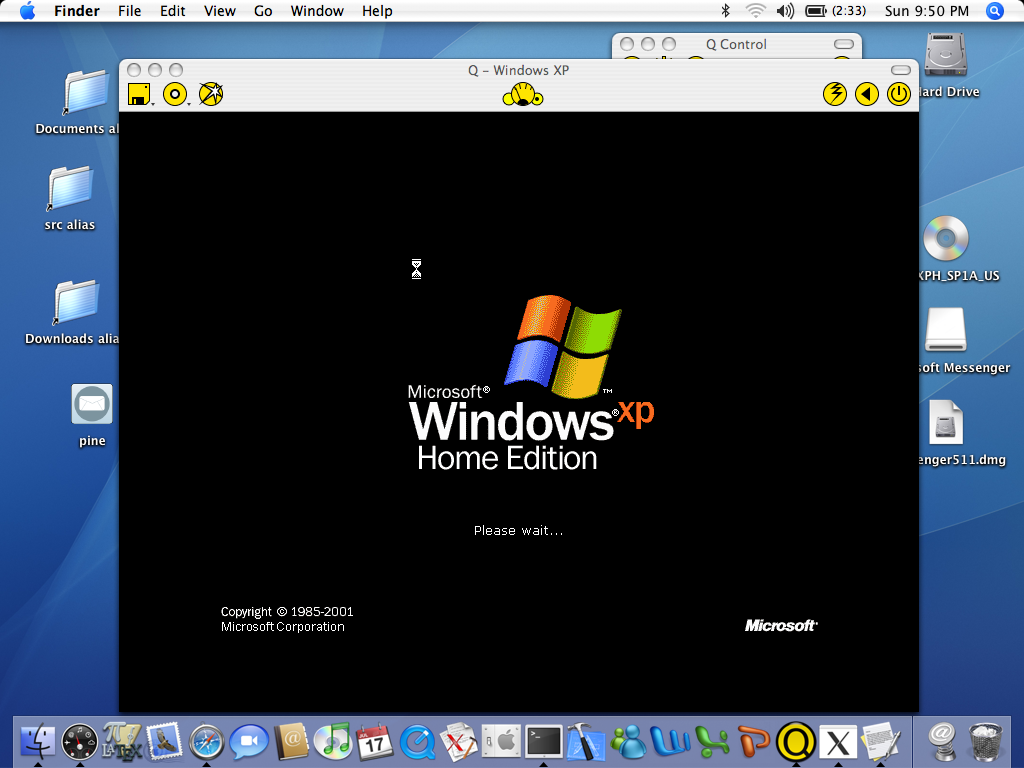
Although I prefer Mac OS, Windows still has some advantages...one actually. There are a few applications I use that are only available for Windows. For example, I play this web based online game called Utopia. You can download a calculator to help you do some calculations that can help you make decisions in the game. Unfortunately this calculator is only available for Windows and the developer does not want to port it to Mac OS for whatever reasons he has so I need to use Windows for that. I have another laptop with Windows but this weekend my friend's cat decided to chew the power cable and now the laptop cannot charge its battery. So I spent the weekend looking for a Windows emulator for Mac OS that is FREE. I came across something called Q and it looks like it works, but its really slow. Heres a screenshot of Windows XP on Mac OS:


Strange? Yup it looks strange!

Monday, August 07, 2006

OpenGL Programming

In an effort to get more involved in 3d programming which may be my field of study when I finally sort out my Masters of Engineering here at McMaster I downloaded what is referred to "The RedBook" which is the official guied to learning OpenGL.
OpenGL is an environment for developing 2d and 3d graphics applications from simulations to games. Its widely used in industry since its first release in 1992. FlightGear and VDrift which I have been working with during my employment with the Flight Simulator use OpenGL to render the graphics and gameplay. I think its really good to have it on my resume and downloading this official guidebook is a good start. Ill be posting updates on this as I get more involved.

Thursday, August 03, 2006

Moog screenshot

Here is the screenshot you were promised yesterday:

Some more changes were done today..its getting better everyday..hmm..The stop server button is not aligned properly...grr..

Wednesday, August 02, 2006

Modularize Modularize Modularize

Four years of software engineering and years of getting that word hammered into my brain and I still failed to follow that concept at work which got me in trouble later as I have been modularizing my work for the past three days..If I did it from the start I would not have had this happen. The problem is that everything was together and I had no easy way of modifying the interface. Modifying anything on it required creating a new interface file, then copy the generated code and replace the old code in that one file I had. So I got sick of that, plus it would not be a good idea to hand that source to my prof as it was not organized at all. Now all the functionalities of the interface are in one file, and the look of it is in another that gets produced automatically by Fluid which comes with FLTK. (If you remember what I was talking about a month or so ago).

Heres a screenshot taken today:

..great...my blog does not want to upload a photo..I shall put it up later.