Showing posts with label SEO. Show all posts

Thursday, June 04, 2009

On Guaranteed SEO Results: Have I got a deal for you

A search for "guaranteed SEO" on Google returns about 5,300,000 results. On the first page alone 6/10 results mention the word "Google". So this begs the question, is there such a thing as "guaranteed SEO"? Let's find out.
According to Matt Cutts Google ranks pages according to relevance and reputation. Why should you believe him? well because he is the head of the Google Webspam team. When it comes to search; Google Search, Matt Cutts is the man to listen to. So listen to him.

Reason 1: You can't become relevant over night
Being relevant is something you acquire over time. Measuring relevancy is something that gets tweaked over time. So by nature Google's ranking algorithms will and must change over time to maintain relevant rankings and improve their measure of relevancy. So how can you, you or you guarantee relevancy? I can promise you the sun will rise from the east tomorrow (if it didn't then SEO is the last thing on anybody's mind), but can anybody promise you a million dollars tomorrow? Sure someone can; somebody very generous and with a million dollars to give away. For SEO that generous billionaire would be Google, but then if they do, can they remain relevant? You get my point.

Reason 2: You can't become reputable the next day
Building any reputation takes time; even a bad reputation. Your website's reputation is critical for ranking on the SERPs. The more PageRank the higher you rank. You get more PageRank by getting inbound links from others with high PageRank. Quality over quantity. 1 million times zero is still zero.

Reason 3: Because Matt Cutts said so
According to him, the best SEO strategy is adaptive SEO. Just like any optimization algorithm, you make gradual improvements and take a measurement against the objective function. Rinse and repeat, but don't get overly obsessed with it; quit when you hit the point of diminishing returns, then try something else. 
This process obviously takes time and research. But thanks to Google they give you all the tools and information you need to rank high on the SERPs.

For my blog I follow three simple rules:
  1. When I write about something, I put myself in the shoes of someone looking for the information I am about to write on. I make a list of these keywords and naturally include them in my post.
  2. Every month I use Wordle.net to generate a tag cloud of my blog. This gives me a good idea about the keyword distribution and whether I have enough keywords on the topics I would like to rank high on.
  3. I make sure each of my posts' URLs contain the main keywords. This step is crucial.
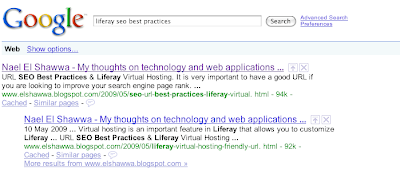
With these three steps, I rank pretty well on some topics:


Now, have I got a DEAL for you... : )


Thursday, May 21, 2009

Referential Integrity: honesty is the best SEO policy

What does it mean to provide something that is relevant, precise, and efficient? The common factor between these terms is the truth and nothing but the truth. Google defined the rules for this game; they want to help you rank higher, but you need to play by the rules. If you do so you get rewarded by PageRank i.e. your pages will rank higher on the search terms that you want. Try to cheat the system and you will get punished. Google does not assign these search terms for you, you pick them; its up to you to pick the right terms and follow the rules. One of my posts ranks #1 on Google for the search term "liferay seo best practices":


What does it mean for one to have 'integrity'?

According to Wikipedia 'integrity' has to do with perceived consistency in a holistic fashion. Integrity is also perceived as the quality of having a sense of honesty and truthfulness in one's actions. Integrity can be tested subjectively by one's individual methods or objectively by scientific methods. Take for example your purchasing process before paying for a product or service. Every wise purchase decision includes research. Normally you would research the products or services you are interested in and see for yourself what they say about themselves. The end product of this stage results in a list of potential products that you are considering for purchase. In this stage you are testing the product for relevance, precision and efficiency. Next comes your method to test the list of potential products for honesty. Usually one would do this by getting feedback from others who have made the 
purchase. The end product of this stage is another list of potential products - hopefully a smaller list than what you started with. You now rinse and repeat this cycle until you reach a small enough set to actually make your decision and do the purchase. 

What is 'referential integrity' ?

This term comes from relational databases. Basically it is consistency between coupled tables. The following diagram from Wikipedia shows what it means to have referential integrity and what it means to have broken referential integrity.
Although the second record of the album's table claims the album 'Eat the rich' belongs to artist #4 the actual artist's table does not confirm this claim since there is no artist #4. Hence referential integrity is broken in this case. 

How can enforcing your "website's referential integrity" reward you with more traffic?

It all starts with honesty. Do not try to write content for search engines, it does not work because it is not relevant, not precise and not efficient. Hence it is not truthful. Write content that people will find useful. There are things that you can do that are under your control; for example building references between your websites pages. There is no reason why one would not be able to do this properly. You need to be objective with these links as well; "Home" is not an objective link yet it is very common to have on a website. "Products" is not an objective link yet it is also very common to have on a website. The page title is not the only important factor, the name of the page or URL is also important; "home.html" or "products.html" is not an objective name. It is very important to have objective page names and titles - for example "What is Referential Integrity? and how can it increase your PageRank" is an objective title. "/referential-integrity-increase-pagerank.html" is an objective page name. By being careful with picking page titles and names you are already well underway in improving your ranking on search engine result pages.

A database designer knows what database normalization is. The concept behind database normalization is also applicable in writing great website copy. Basically database normalization is the process of organizing your data in an efficient way. The two main objectives are eliminating redundant data and eliminating the storage of the same data in multiple locations. With regards to website copy, it is important to aim to write copy for each page to allow that page to rank high on specific search terms without cannibalizing your other pages' rankings. This is easier said than done, especially if you are writing a blog since usually you have a certain number of topics that you write about. Eventually you will get multiple pages ranking for the same search terms as the image of my blog's ranking for "liferay seo best practices". 

The second component of an SEO strategy is to proof of your integrity. At this point you have written honest and complete copy for your pages. This stage is something out of your control, but this does not mean you cannot do anything to help you in this stage. By writing honest copy you increase the chances of others finding your information complete and truthful hence increase the chances they would link to you from their websites and blogs. Social networks are extremely helpful in this stage and as I have described in an earlier post "SEO without social; Cereal without Milk". You can publicize your content on social networks such as Facebook and Twitter as I am doing right now. This helps you broadcast your content to a much larger audience, increase your traffic and eventually generate some inbound links. 

How does Google prevent SEO abuse?

The main line of defense Google has against this is their PageRank algorithm. This algorithm rewards for being truthful as well as punish you for cheating. For example if one were to create 100 fake websites to link to their company website. The PageRank algorithm shares a page's credibility with every other page that it links to. So in a case of 100 fake websites, odds are they all have a very low PageRank if not zero. This also strengthens the argument on promoting your website on social networks because of most them have a high PageRank (8 or 9) which is comparable to high profile sites such as the New York Times. Obviously it is easier to get a link on Twitter than it is to get on the New York Times and the fact that a good share will by the nature of social networks get re-shared or re-tweeted you will get far more links and faster than you can get one link up on the New York Times.

Again honesty is always the best policy - even for SEO. Understand how referential integrity works and play by Google's rules and you will be rewarded.


Sunday, May 10, 2009

Liferay Virtual Hosting & Friendly URLs


Virtual hosting is an important feature in Liferay that allows you to customize Liferay URLs to suit your needs. You may want to customize the URL for SEO reasons or user friendliness or you may just not like having that '/web/guest/home' in the URL.

What is the /web/guest/home for anyway?


First let us try to understand what it means. The name of the servlet that deals with incoming requests is the 'web' servlet and hence '/web/ is a mapping to that servlet. Obviously '/guest' maps to the 'Guest' community i.e. your public facing pages. And 'home' is the name of the page you are requesting within that community.


Remove /web/guest/home through Liferay Virtual Hosting

After you login as an administrator user, click on the 'Control Panel' under the dock.


Click on 'Communities' under the 'Portal' tab on the left hand side. 


You should see the following page with all your communities.


Click on the actions button and select 'Manage Pages' for the community you want to setup Virtual Hosting for.


On the next page click on 'Settings'


Then select 'Virtual Hosting'


Enter the domain name for your website. For purposes of this How To document I added an entry in my local hosts file to get this working locally. On a public portal you would just enter www.mywebsite.com.

Save the new settings and go ahead and test it. You should now only see the name of the page after the URL. 


This is really handy when it comes to search engine optimization since the URL of a page is really important and the '/web/guest/' component of it does not add any value to the URL, in fact it kind of dilutes your URL when it comes to search engines.

You can do this for your other communities as well. So if this were an organization portal, your members virtual host can be 'my.organization.org' and your staff can be 'staff.organization.org'. 

Feel free to drop me a line and share this How To.


Saturday, May 09, 2009

Real time, social, microblogging and context aware searching

A couple of days ago Google's Eric Schmidt reportedly said that Google is looking into ways of intergrating microblogging within their search. 'Microblogging' is really code name for Twitter and this news is rather interesting after the rumors earlier this week about Apple, Microsoft and Google were eyeing Twitter - Twitter's co-founder Biz Stone was on the The View on Wednesday to announce that Twitter is not for sale.

What could real-time microblogging search do for Google?

From a user experience point of view, the current search does not really feel real-time mainly because the results don't update as they do on Twitter Search. Real-time search would also make the Google search engine more aware of the context of the search query and hence be able to deliver context-aware advertisements.

Yet micro-blogging introduces an interesting problem that Google would need to solve first. Conversations on twitter are threaded and posts can come down to a short
user2: @user1 yes its amazing
which means context is spread across all the conversation's threads. There are several applications online that give you access to a threaded view of Twitter - something that Twitter does not have but it should. Any real-time microblogging search needs to support threads to be able to deliver more relevant content. By nature search queries are really questions which works well because conversations usually start with questions or an opinion. When I search 'mac mini' on a real-time search I'm not very interested in Apple's Mac Mini product page, I am more interested in knowing what others are saying about it right now. So If my hypothetical Twitter post above was in response to:
user1: do you like your new mac mini?
searching for 'mac mini' should ideally be able to show that threaded conversation even though the words 'mac mini' are not present in user2's response.

Real time search and Search Engine Optimization

Not so long ago - when people read physical news papers instead of online news - if someone wanted to know what has happened in the past 24 hours they would buy a newspaper. The news paper is similar to real-time search, it will inform you of new events around you and in the world. Also not so long ago - when people went to the library to get access to newspaper archives instead of online archives - if someone wanted to learn about an event that happened 10 years ago they would visit the local library and pull out archived newspapers that mention that event. Although current search engines can index pages very quickly, it still feels like archived news - in fact search engine result pages are really archived news.

In a real time search engine pages need to be ranked a little differently that how they get ranked right now and hence SEO practices need to change to accommodate these changes. Because conversations on a microblog like Twitter are threaded user2's response 'yes its amazing' would not rank at all on a search for 'mac mini' although that response is probably what the user wanted to see i.e. mac mini reviews. Maybe another user responded:
user3: @user1 its great, i installed tweetie, evernote and am in love with front row
That too should show up on a real time search since it is showing different applications one can get on a Mac. Threaded conversations on microblogs should be looked at in the same manner comments are viewed at the bottom of a blog post - except these comments are not nicely grouped together with the original post on Twitter. 

This introduces new problems, since conversations can have nested threads:
user4: @user3 yup tweetie is the best Twitter application and front row is just too sexy
and then loops:
user4: @user1 I use my mini as a media server at home

Real time search is Social Search

Information is being added to the Internet today at a much faster rate than before the Social Networks age.  A lot of this content is being added by individuals all over the world on dozens of social networks like Facebook, MySpace, Twitter, Blogger, Youtube, etc. In my opinion this content is the most useful to be presented in a real time search engine. Real time news can still be delivered through the participation of news organizations in social networks - as they do today. 
Real time search would also allow the search engines to deliver truly personalized content and targeted advertisements.  Google recently allowed users to create Google profiles and link it to your online identities across the many social networks. Search today is not aware of "where you are right now" so how can it truly direct you to where you want to go? Consider the Google search page as a map, and for Google to be able to deliver relevant answers to you, it needs to know your "location". I don't mean location as in a physical location with a latitude and longitude, I in fact mean context but for the sake of the argument I am using "location". So imagine the Google search page is a map and you are looking for "mac mini". Google goes out and gets you the most relevant results according to Google for that search term and plots it on the "map" i.e. the search engine results page. If your search term is broad, then your "map" will just contain "locations" all over the place - i.e. Google is unaware of your search context and depends on you to point it to the right context. With real time search and Google profiles, Google can make an educated guess about that context i.e. Google is able to tell what your current "location" is. Real time search on Google can now become a "GPS" and route you to the most relevant "locations" to you. By being able to search your threaded conversations on Twitter for example about the "mac mini" Google can customize the real time results page to contain content that you have discussed with others. Now my search for "mac mini" would produce results on "tweetie", "evernote", "front row", "media server" and "mac mini" - all keywords in the threaded conversation above. 

Now even the advertisements on that page can be personalized instead of the ones I see now including "mac mini store" and "mac sale". These ads are not relevant to me since I already have one - so there is absolutely no compelling reason for me to click these ads. But on the other hand if the advertisement showed "evernote sale 50% off pro account today only", first I would be blown away that AdSense showed that to me, and second I am more likely to click it because  I have the free version of Evernote.


Tuesday, May 05, 2009

New Bloggers: Submit your content to the Social Web - the sooner the better

Over the weekend I created my Technorati Profile to help promote my blog, build links, network and aid in my research before posting. Basically these are the reasons why one should use Technorati - one of many similar tools.

About a month a go I started an experiment on this blog to generate more traffic with more focused and consistent content. The experiment started out with more technology focused content where I mainly write about the Social Web,  Marketing via the Social Web, and applications mainly ones that have to do with a map or mash-up or again the Social Web.

The experiment also included new branding and theme to disassociate myself from the old brand where I wrote about "Random Sh!t" which included many different topics including but not limited to Politics, Photoshop Cartoons, Software, and the Flight Simulator I worked on right after graduation in 2006. I still chose to keep these labels and content as a history and a reminder to remain focused on the new purpose of my blog. i.e. To Present My Thoughts on Technology and Web Applications. 

This blog started in 2006 just after I completed my Software Engineering and Management degree. Back then the topics were not as focused as they are today, and the traffic I am receiving via Twitter is outstanding compared to what this blog was used to.

So I decided to take this experiment a step further and claim my blog on Technorati in hopes to generate even more traffic. The OpenID method of claiming the blog did not work for me so I am using the other method of embedding the provided link on my blog. Instead of just posting the link somewhere on the page, I figured I might as well make a blog post of it and talk a little bit about Technorati. Of course since I have not claimed my blog yet on there I have yet to gain any knowledge on how to best promote your blog on Technorati - feel free to comment to share your experiences -

I will however post on this next week once I have experimented with this new tool. At the end of the road there is no harm done by acquiring another knife to carve myself a tiny piece of the steak one would refer to as the Social Web. 

Saturday, May 02, 2009

URL SEO Best Practices & Liferay Virtual Hosting

It is very important to have a good URL if you are looking to improve your search engine page rank. At least if you are doing everything wrong in terms of SEO, having a good URL gives your website a little bit of hope.

Don't use numbers, page ids, user ids, session ids, or even odd characters
Think about it, if the URL does not speak your language, you will have no idea what content it may point to and hence there is very little reason for you to click it. For example, what gives you more reason to click through this:
this:
http://www.youtube.com/watch/The%20Hostage%20Audi%20Ad
or this:
http://www.youtube.com/watch/The-Hostage-Audi-Ad

Unfortunately Youtube does not have friendly URLs - but they don't need it since they are blessed with high page ranks - on the other hand the rest of us should care.

Don't have multiple URLs for the same page
Here is a thought imagine you are asking for directions to the highway and someone tells you:
  1. You can go North on Cawthra turn East on Burnhamthorpe, then North on Hurontario and you will see the ramps after Robert Spec....OR
  2. You can stay North on Cawthra until you get to the ramps when you reach East Gate
If I am already late or lost I really don't need to think about different routes to my destination. So stick to canonical URLs - that is the standard way of giving out directions i.e. http://www.elshawwa.blogspot.com and not http://elshawwa.blogspot.com

Also, if you are using friendly URLs for your content don't even think about leaving the non friendly URLs. Whatever reason you may have to think it is good, you are wrong. So having http://www.mywebsite.com/members/12 and http://www.mywebsite.com/members/nael is never a good idea. You may tell yourself "But this way I give my users more ways to access my content and they can choose what they like best". Do you know what happens to restaurants with overstuffed menus operating under the misguided notion that more choice is better and that to be successful in that business you need to offer every dish under the sun - even if it means offering french fries in an authentic Indian restaurant? Well, they end up on Kitchen Nightmares with Gordon Ramsay. What you would do in this case, is point these old URLs to a 404 page where you can direct the user to the right URL.

Bloggers: say no to a short URL
Goes back to the first point of having descriptive URLs:
  • http://www.elshawwa.blogspot.com/seo
  • http://www.elshawwa.blogspot.com/seo-url-best-practices
Which would you click on? Sure they are both descriptive but clearly one is better than the other. URLs can be multi word - just separate them with dashes - so make use of max size. On blogger I first publish the post with the keywords that describe my post the best as the title. I then edit it and save it with the proper title I want.

Say no to long URLs
Ok now you might think I am being indecisive here, but hear me out. For the sake of the argument, say you are going for an interview and you are lead through 6 doors, down 4 flights of stairs, through more doors, down an elevator into the basement, and finally through even more doors to meet the boss. What would you think at this point? I would think this is some kind of joke as clearly if this person was of any importance they would not be tucked away where the sun does not shine.
So back to URLs, if you see yourself doing something like:
http://www.mywebsite.com/news/world/europe/italy/soccer/ac-milan 
then think of that boss tucked away in the basement's basement - that is what your visitors will think.

So what is behind my reasons of publishing this? Mainly because by default content management applications generate URLs for you and attach all sorts of stuff to the url, from session ids, content ids, user ids, dates, times, you name it they have it. For example Liferay Portal does that, and if you go to Liferay's website you will see it. That /web/guest/home part is really annoying and adds no value to your URL. Last week I figured out how to get that rubbish out, and from now on this is the first thing I will do when promoting any Liferay portal to production. I'm actually surprised Liferay has it on their production site, and that is mainly the reason why I have incorrectly assumed it can't be removed.

Removing the /web/guest/home part from a Liferay URL is easy:
  • First go into your Communities Admin panel and decide on the Community you want to do this for
  • For your public facing site, that is your Guest community. So click on the Configure Pages action under Actions
  • One of the tabs is "Virtual Hosting" - click on it
  • Set up your public domain i.e. mywebsite.com
  • Clear out the field that appends /web after the domain. Usually you don't want anything in there unless you have multiple Communities in Liferay


Thursday, April 23, 2009

Pimp Your Slides Using Prezi.com

Learned about this neat presentation online application called Prezi. 100% online, free to use with some limitations (no private presentations, 100MB limit). Still awesome application, easy to learn and fun to use.

Love it.

Decided to give it a test drive and make a prezi out of my last topic "How To: Use Twitter Feed and Bitly to Promote your Blog"


Sorry about the bad quality images, I just saved them off the sites.


Link to it here or view full size/full screen: http://bit.ly/PoJB3

Wednesday, April 22, 2009

How To: Use Twitter Feed and Bitly to Promote your Blog

A couple of weeks ago I joined twitter in effort to experiment more with promoting my blog and get a bit more traffic.

Before I get into that, rule number one in generating traffic is

Content is King
Now I am not an expert in advertising via the social media nor advertising via any media, but I have learned a lot about promoting your blog and self using twitter over the past few weeks. As I learn more I will share more.

Seed your blog with content first
Don't start promoting if your blog is empty. Seed it with good, interesting and valuable content. Whether it is advice, comments on something you read in the news, challenges and how you overcame them (or if you did not, then what did you try and did not work) . So have some content on there so that when someone does visit, they are not welcomed by just a few short posts that do not add any value.

Creating good titles for your posts
When you create a post the first title you save it with is used to generate the URL for that post. So titles are very important and a good title will help that content get ranked on search engines and help your blog overall. A good tip I read was to first pick a series of words that will describe the new post best. For this post I picked "Use Twitter Feed Bitly Promote Blog Tips Suggestions". Publish the post with that title and then go back and add a proper title to it.

Join Twitter
Twitter is more than just reading what your friends are up to. Use twitter to stay up to date on news, weather, topics, technology, cars or whatever else interests you. Don't limit your follows to people you know, follow people based on what they are contributing - if what they posted today was valuable to you, odds are something they will post tomorrow will also be valuable. A lot of companies have joined twitter and promote their products and services on twitter. Follow these companies to get updates, news, and even help with their products.

Unlike Facebook where you can get 10,000 friends without even knowing 2% of them, you need to add value for someone to follow you, sure you can follow him, but the idea is to build your online identity; an interesting online identity. If your online identity revolves around following 10,000 people and not adding value then the opportunity you had there will not come again. Celebrities are a special case, even if they don't post that often. (If you are a celebrity and reading this post please leave a comment, if your're not still comment!)

Blog. Check. Twitter. Check. What's next?
So by now you have some good content on your blog, and you have built a small network on Twitter. Now what about Twitter Feed and Bitly?

Twitter Feed
Twitter Feed will publish your posts on Twitter on your behalf. Just sign up for an account and authorize it to do so by providing your username and password for Twitter or by authenticating your Twitter Feed username with Twitter. You can configure how often you want it to check your posts and what to prefix each post with.
Most if not every blogging tool provides you with a URL where your blog's RSS feed is published to. Simple point TwitterFeed to that RSS Feed and you are done.

Why use #hashtag for your blog posts?
I used #NESBlog to prefix my blog tweets giving me a way to easily search Twitter and see if any of my posts were retweeted. None so far, but I only started this yesterday. I'm optimistic I'll get my moment of fame sooner or later.

bit.ly
bit.ly is a url shortener. It also allows you to track each url and see how visits each got. Sign up for an account and configure TwitterFeed to use your bit.ly username and API key. There are many other services that do this, bit.ly was just the first I signed up for and so far its working out well.

Next time TwitterFeed reads your blog's RSS feed it will send your last post as
:


Note: If your posts show up on twitter with a "You must be authentication to a ..." the bit.ly API key is incorrect. Copy it and paste it back in again carefully.

That covers the set of tips I learned over the past few weeks at promoting my blog using Twitter, Twitter Feed, and Bitly url shortening.

Don't forget to comment and let me know what you think or share some other tips!